A UX research study on IU library’s digital map
Finding the way
User research
Usability testing
UX Strategy

When finding
your way
becomes the
real challenge
Why do we use a map? To find our way to a place, right? But imagine standing inside a huge library, phone in hand, staring at a digital map that’s supposed to guide you and yet you still have no idea where to go. You take a few steps, glance around, and finally give up to ask someone for directions. That’s exactly what many students at Indiana University experienced. Even with a digital map available, they struggled to navigate the library. What seemed like a simple task became a daily struggle. It wasn’t just a small inconvenience, it added extra mental effort as students tried to memorize routes, follow scattered signs, or figure things out through trial and error.
My focus
Was to uncover the usability challenges and provide a clear, research-backed recommendations that could make navigation simpler, faster, and more satisfying for every user.
Understanding
how users really
navigate
After setting the goal, I wanted to understand how users actually used the digital map to find their way around the library, so that I can observe how they interacted with the interface, how they made decisions, and where things started to fall apart. For this I asked questions like:
Can they find specific area or services without asking for help?
Does the digital map match how they naturally think and move through the space?
Where do they pause, hesitate, or lose their sense of direction?
How I
conducted
the study
Post task I collected both quantitative (SUS) and qualitative (interview insights) data to identify usability issues.
I approached students near the library
Screened them based on experience (new or limited exposure to the digital map)
Selected 10 participants
(5 undergraduates + 5 graduate students)
Participants were asked to:
Navigate to an assigned room using only the digital map.
No external help was allowed.
I used think-aloud protocol and participants verbalized their thought process as they:
Located specific area or services
Moved between different areas
Decoded color schemes and legends
What the
numbers
revealed
Based on the quantitative data collected, the System Usability Scale (SUS) score was calculated. The results showed that the digital map needed significant improvement, with a score of 58.5, falling well below the industry benchmark of 70.
0
10
20
30
40
50
60
70
80
90
100
Worst imaginable
Poor
OK
Good
Excellent
Best imaginable
Not acceptable
Acceptable
Marginal
58.5
The gaps I
found
Lack of awareness
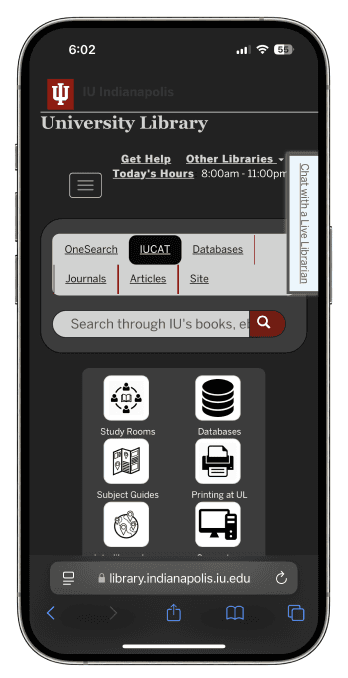
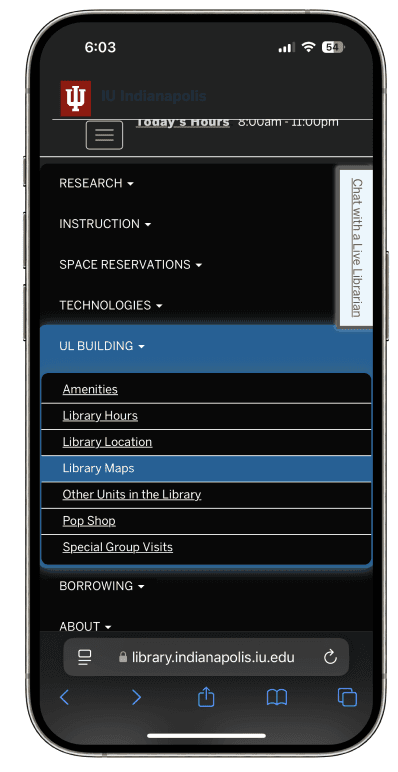
Many users were unaware of the map feature.
They found it difficult to locate the map on the library website and app.
New users struggled to find it.
" height="14.516744467644251px" id="Ns_vX19Xf" transform="translate(106.662 61.012)" width="14.937215071363113px"/><path d="M 11.704 13.639 C 13.483 15.229 17.772 12.062 9.652 4.94 C 4.322 0.272 2.059 -0.837 0.537 0.568 C -2.339 3.221 7.058 9.452 11.704 13.639 Z" fill="rgb(16, 232, 214)" height="14.041173346540617px" id="lQQS84Eb7" transform="translate(89.435 46.43)" width="14.434941538387775px"/><path d="M 23.074 17.656 C 23.466 17.68 20.407 18.745 16.268 20.036 C 7.336 22.836 4.791 23.847 4.474 24.834 C 4.087 26.023 5.093 27.5 6.254 27.514 C 6.678 27.507 9.489 26.739 12.52 25.804 C 18.987 23.769 29.137 20.966 33.386 20.027 C 39.271 18.735 40.525 18.316 40.825 17.658 C 41.592 16.05 41.1 15.632 32.441 10.981 C 25.872 7.44 23.724 6.105 21.905 4.469 C 17.643 0.656 17.236 0.333 16.433 0.131 C 11.279 -1.126 17.451 6.988 24.957 11.339 C 26.461 12.221 27.488 12.983 27.262 13.052 C 26.446 13.278 15.369 11.888 9.248 10.822 C 2.434 9.662 1.706 9.599 0.784 10.444 C -2.903 13.824 6.723 16.928 23.074 17.656 Z" fill="rgb(16, 232, 214)" height="27.513948850878236px" id="iXmXB5Tei" transform="translate(125.562 67.656)" width="41.07919080375329px"/><path d="M 0.024 3.777 C -0.103 4.864 0.232 5.146 1.948 5.373 C 4.665 5.721 17.416 3.864 18.366 2.992 C 21.612 0.016 12.003 -1.111 4.235 1.336 C 0.654 2.438 0.166 2.747 0.024 3.777 Z" fill="rgb(16, 232, 214)" height="5.416031407441359px" id="AA4lxKCpq" transform="translate(1.003 20.16)" width="19.01424629809407px"/><path d="M 5.303 5.034 C 17.819 5.74 16.997 5.824 17.578 3.987 C 18.419 1.312 8.683 -0.993 2.592 0.439 C -1.996 1.479 -0.121 4.726 5.303 5.034 Z" fill="rgb(16, 232, 214)" height="5.49935891317304px" id="ee_A52xGI" transform="translate(27.34 21.852)" width="17.629279418170718px"/><path d="M 9.546 8.41 C 13.363 10.185 13.636 10.186 14.39 8.695 C 15.991 5.664 6.185 -1.109 2.046 0.155 C -2.21 1.455 0.121 4.062 9.546 8.41 Z" fill="rgb(16, 232, 214)" height="9.779661627844689px" id="GhO9dzrGj" transform="translate(70.799 35.21)" width="14.565158468816364px"/><path d="M 3.964 4.522 C 4.152 4.528 6.893 5.153 9.983 5.923 C 16.52 7.563 17.328 7.463 16.759 5.05 C 16.117 2.346 2.44 -1.417 0.312 0.545 C -0.904 1.666 1.665 4.492 3.964 4.522 Z" fill="rgb(16, 232, 214)" height="7.0282761842825465px" id="XM2JavUGu" transform="translate(50.563 26.848)" width="16.909019118865565px"/></svg>)
Challenges on mobile devices
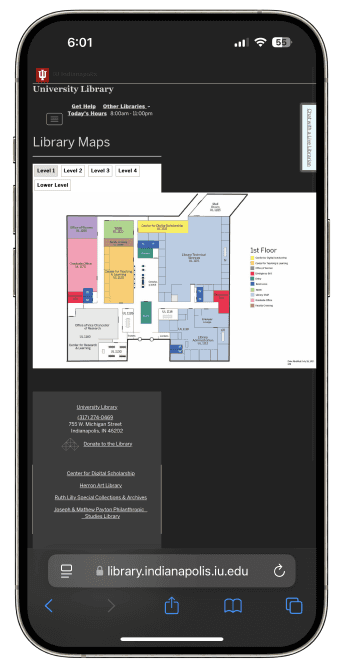
Small screen size made the map harder to use.
They faced difficulty with zooming, text readability, and navigation on mobile.
Mobile experience was cumbersome compared to desktop.
Confusing map design
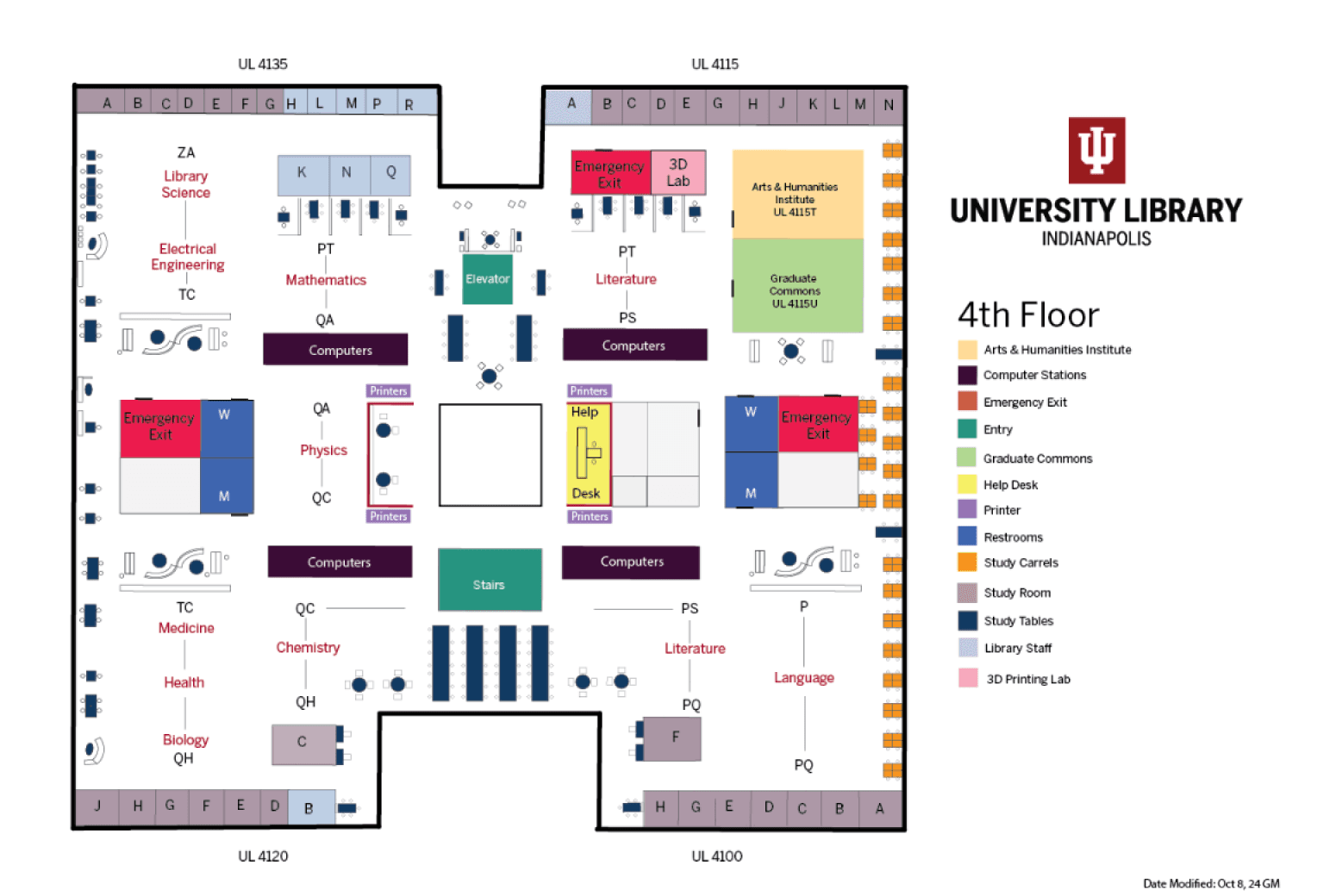
Users found map design overwhelming.
Dense information and unclear visual cues left them confused.
Color coding and room labels were not intuitive.
Turning insights
into action
Based on the findings from user testing and SUS scores, here’s a summary of the key usability issues, the solutions I proposed, and the impact these changes would create.
Issue
Problem
Solution
Impact
Efficient search tool
Visibility of map feature
Clear navigation
Users struggled to find library map quickly.
Many users were unaware of the map’s existence.
Users had difficulty zooming and finding specific areas.
Implement auto-suggestions and filters for refined searches.
Faster search results and improved accuracy.
Enhanced legend visibility and standardized colors.
Improved readability and quicker map comprehension.
Intuitive color codes
Color coding was inconsistent and unclear.
The map should be made highly visible on the homepage with clear labels.
Add pinch-to-zoom and clickable sections for easy navigation.
Increased map usage and user engagement.
Enhanced mobile usability and faster wayfinding.
By the end of this project, I truly understood the impact a poor design can have. The confusion and frustration users felt showed me just how important clarity is, whether in a physical space or a digital one. This research-focused project also taught me the value of using quantitative tools like the SUS. They helped turn what users were feeling into measurable insights that could support stronger, evidence-based design decisions.